Web Development · Guide

Building a product that search can find from the first release.

An MVP, a tool or a digital product is usually built to do a job, and search is added later if at all. This page explains what search needs from each, using Google's documentation where it has any, and says plainly where it does not.

Talk to an SEO specialist More on Web Development

MVP development

Google has no guidance on building an MVP, or on deciding what one should contain, so there is no citation for that and we will not invent one. What Google does document is what any new site needs to be found. Google Search Essentials describes technical requirements that it says are few, and notes that meeting them does not mean Google will crawl, index or serve a page. Its key best practices include using the words people would search for in prominent places, and making links crawlable so Google can find other pages.

The SEO Starter Guide says Google primarily finds pages through links from other pages it has already crawled, and that a sitemap is optional. To check whether a new site is in the index at all, it suggests searching with the site: operator, and if nothing appears, going back to the technical requirements. The site move guidance adds a launch trap: some owners block all crawling while a site is in development, and those robots.txt or noindex rules must be removed when the site goes live.

For a founder, the practical point is that indexing, structure and tracking are far easier to set up before launch than after. We build MVPs the way we describe the path for founders: decide what to build and what search demand says about it, build the smallest version that tests the idea, then launch with indexing, structure and tracking in place. Simple projects stay simple, with no six-month agency engagement for something that should ship in weeks.
Source: Google Search Central: Google Search Essentials

Custom tools

A tool is often a web application, and that is where Google's JavaScript SEO basics apply. Google can run JavaScript, but a page that depends on it for its content is rendered after it is crawled, links need to be real a elements with an href, and meaningful status codes matter: a 404 for a page that does not exist, or a 401 for a page behind a login. Googlebot also parses the rendered HTML for links, and Google says it is fine to inject links with JavaScript as long as they follow the best practices for crawlable links. Routing that relies on URL fragments is the pattern to avoid, because Googlebot cannot reliably resolve those URLs.

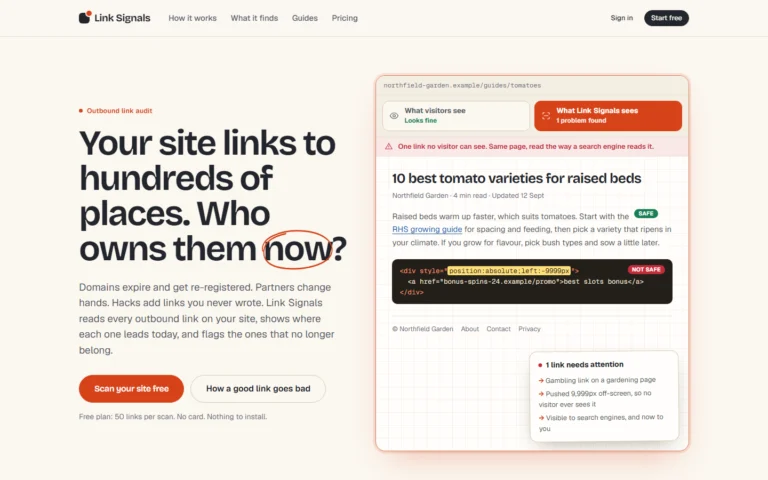
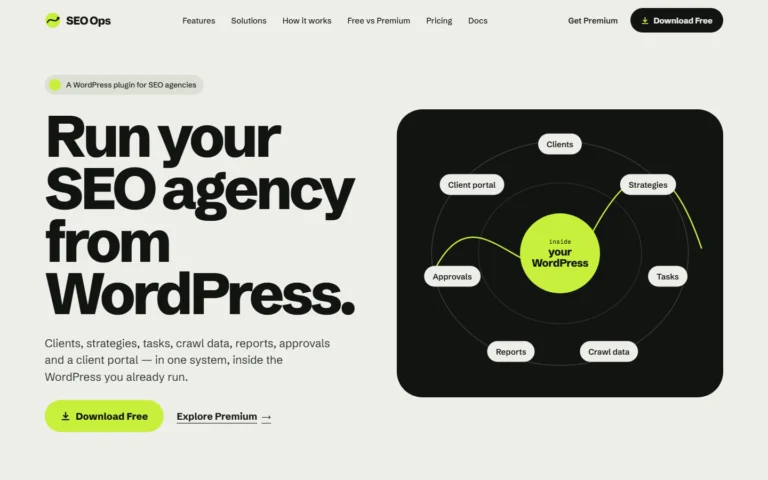
Our own tools show the range. SEO Ops is a WordPress plugin that keeps SEO clients, strategies, tasks, crawl data, reports, approvals and a client portal in one system; it needs WordPress 6.5+ and PHP 8.1+ and runs on your own install. Link Signals is a web tool that reads every outbound link on a website, shows where each one leads today, and flags links that no longer belong. It reads public pages only, and states its limits: it cannot see links behind a login, and links built only while scripts run may be missed.

We cover custom tools as part of Web Development. If you want something like this built, describe it and we will say how we would build it.

Source: Google Search Central: Understand JavaScript SEO Basics

Digital products

A digital product can have a public side that needs to be found, such as a home page, feature pages, documentation or listings, and a private side that does not. Google's guidance applies to the public side. URL structure guidance asks for readable URLs and no URL fragments to change content. Google's canonicalization documentation explains how it clusters duplicate or near-duplicate pages and picks one, which matters whenever the same item is reachable by several URLs.

Mobile matters here as well: Google uses the mobile version of a site's content for indexing and ranking, and recommends responsive design as the easiest pattern to implement and maintain. Machine-readable information is another part. The structured data introduction says markup gives Google explicit clues about a page, and that it should describe content visible on that page. For content that should not appear in search at all, Search Essentials says to use the appropriate method for controlling how content appears in Google Search.

We build digital products with these decisions made early: logical, stable URLs, semantic templates, content in the HTML and structured data designed with the content model. Because a product is rarely finished at launch, the same thinking carries into later releases, which is covered under ongoing development. Digital products sit alongside websites and ongoing development in our Web Development work.

Source: Google Search Central: Intro to How Structured Data Markup Works

What Cultured Digital covers: Products

We build MVPs, custom tools and digital products with organic search in the architecture from the first line of code. For founders, the path runs from concept to MVP to live product to organic search, with someone who understands both the build and the search side.

We can lead the build, join your team, or specify the SEO requirements and review the result. Scope depends on the problem, so we agree it after a conversation; there are no price tables. We are not a generic web design agency and we do not run PPC or social, so what you get is the build and the search thinking behind it. The same applies when a founder simply needs an MVP live, quickly: concept, MVP, live product and organic search, in that order.

Built by us

Tools built by Cultured Digital: Products

Two products we built ourselves, both live.

Screenshot of the Link Signals website: "Your site links to hundreds of places. Who owns them now?", with an example page showing a hidden link that visitors cannot see but search engines can. Tool · Live Link Signals Reads every outbound link on a website, shows where each one leads today, and flags links that no longer belong. View tool →

A web tool that reads every outbound link on a website, shows where each one leads today, and flags links that no longer belong.

Screenshot of the SEO Ops website: "Run your SEO agency from WordPress", with a diagram of clients, strategies, tasks, reports, crawl data, approvals and client portal inside WordPress. Tool · Live SEO Ops A WordPress plugin that keeps SEO clients, strategies, tasks, crawl data, reports, approvals and a client portal in one system. Built with: WordPress plugin (WordPress 6.5+, PHP 8.1+), runs on your own WordPress install View tool →

A WordPress plugin (WordPress 6.5+, PHP 8.1+) that keeps SEO clients, strategies, tasks, crawl data, reports, approvals and a client portal in one system.

Questions

Products: questions answered.

Does Google have guidance on building an MVP?

No. Google's documentation covers how pages are found, crawled, rendered and indexed, not how to decide what an MVP should contain. It does cover the technical requirements any new site needs to appear in Search.

How quickly can an MVP ship?

Simple projects stay simple. We do not run a six-month agency engagement for something that should ship in weeks. We agree scope after a conversation.

Can you build a tool like SEO Ops or Link Signals for us?

Describe it and we will say how we would build it. Both tools are live on our Tools pages.

Does a tool behind a login need SEO?

Google's JavaScript guidance gives a 401 status as the example for pages behind a login. The public pages around a product, such as the home page and feature pages, are the ones that can be found in search.

Can you work with our existing developers?

Yes. We can lead the build, join your team, or specify the SEO requirements and review the result.

Got a product idea? Start with search.

Tell us what you want to build. We'll say what has to be decided before the first line of code.

Talk to an SEO specialist