Web Development · Guide

Keeping a site fast, current and crawlable after launch.

Launching a site is the start of its life in search, not the end of the work. This page explains what implementation, performance and continued development mean for search, using Google's own documentation.

Talk to an SEO specialist More on Web Development

Technical SEO implementation

Implementation is where a recommendation becomes a change on the site: a template edited, a redirect added, structured data written, a canonical corrected. Google's documentation is mostly about what a correct result looks like, and it points to tools for checking. The URL Inspection tool in Search Console lets you check how Google sees a specific URL. Google's structured data introduction advises checking markup with the Rich Results Test during development and monitoring it afterwards with the rich result status reports.

The site move guide shows the same habit for redirects: test them with the URL Inspection tool for single URLs, or with command line tools or scripts for large numbers. Google's JavaScript troubleshooting guidance likewise suggests testing how Google crawls and renders a URL when content fails to appear, and collecting and auditing the JavaScript errors that users, including Googlebot, encounter.

The point is that a change is not finished when it is deployed; it is finished when it has been checked on the live site. We cover technical SEO implementation: templates, redirects, structured data and tooling built by us where that is faster than waiting on a queue, or written up as tickets with the fault, the evidence, the fix and the acceptance test for your developers. Releases are checked before and after launch. See implementation and QA and our article on audit findings that get implemented.
Source: Google Search Central: Intro to How Structured Data Markup Works

Performance and scalability

Google's Core Web Vitals page describes three metrics: Largest Contentful Paint for loading (aim for within 2.5 seconds), Interaction to Next Paint for responsiveness (under 200 milliseconds) and Cumulative Layout Shift for visual stability (under 0.1). Google highly recommends good Core Web Vitals, and says they align with what its core ranking systems seek to reward. Its page experience guidance adds that site owners should not focus on only one or two aspects: secure serving, mobile display and intrusive interstitials are on the same list.

Scalability has a search side too. Google's crawl budget guide says the crawl capacity limit rises when a site responds consistently with stable or improving response times, and falls when the site slows down or returns server errors or rate-limiting signals such as 429. The same guide is written for very large or rapidly changing sites, and says other sites do not need it. For those sites it says that if Google can load and render pages faster it may be able to read more content, and it lists optimising server response times, supporting HTTP caching with 304 responses and avoiding long redirect chains. Adding server resources is named as one way to raise crawl budget when server capacity is the limit. The site move guide also warns that Google crawls more heavily after a move, so servers need capacity.

We treat performance as budgeted, not hoped for, so it is decided at the start of a build. Performance is one input among many: most serious technical problems sit in crawling, indexing, rendering and architecture, which is why Core Web Vitals are not the whole story in our Technical SEO work.

Source: Google Search Central: Understanding Core Web Vitals and Google search results

Ongoing technical development

A site keeps changing after launch: new templates, plugins, content types, hosting, integrations. Each change can affect crawling or indexing, and Google's guide to debugging traffic drops is a reminder of how. It lists technical issues, such as server availability, robots.txt fetching, page-not-found errors and a misplaced noindex tag, among the main causes of a drop, and points to the Crawl Stats and Page indexing reports to find them. It also notes that a noindex problem shows as a slower drop, because it depends on Google recrawling the page.

The same guide says some changes take effect in days while others take months, and that there is no guarantee a change will have a noticeable impact. Our approach to measurement reflects this: we do not promise rankings or traffic numbers, we set out the opportunity and the evidence, and measure against it.

Ongoing technical development is part of our ongoing SEO work, alongside technical SEO implementation, performance and scalability, and SEO QA that checks releases before and after launch so regressions are caught early. Google's sitemap guide adds a small recurring detail: it uses a sitemap's lastmod value only if it is consistently and verifiably accurate. It is a loop rather than a one-off checklist: investigate, diagnose, prioritise, implement, measure, iterate. Consultancy differs because it adds expertise to your team, whereas ongoing SEO means Cultured Digital runs the programme; many clients move between the two. See ongoing SEO.

Source: Google Search Central: Debug Google Search Traffic Drops

What Cultured Digital covers: Ongoing development

We cover technical SEO implementation, performance and scalability, and ongoing technical development as part of Web Development and Ongoing SEO. Recommendations that are stuck waiting for development are a typical starting point: we can hand a prioritised roadmap to your developers, work alongside them, or build and implement the changes ourselves.

SEO QA is part of the work: releases are checked before and after launch, so regressions are caught early rather than found in a traffic report. Performance is budgeted at the start of a build rather than hoped for later. Scope depends on the site and the problem, so we agree it after a conversation. Related: websites, rebuilds and migrations and Technical SEO.

Built by us

Tools built by Cultured Digital: Ongoing development

SEO Ops is a WordPress plugin built by Cultured Digital.

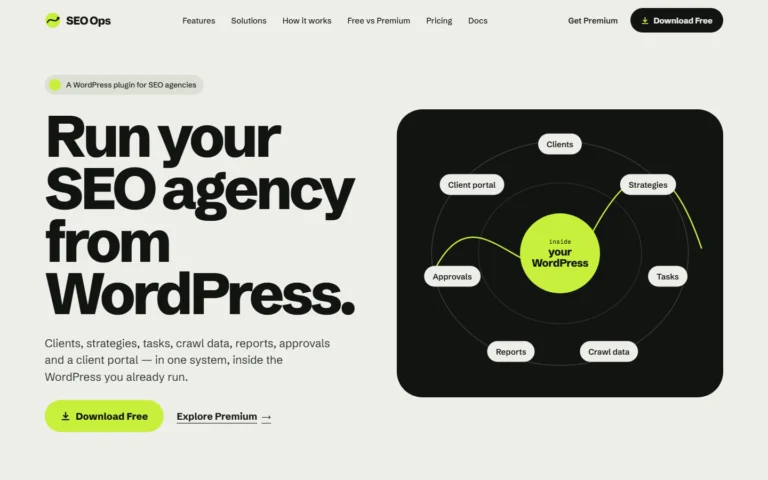
Screenshot of the SEO Ops website: "Run your SEO agency from WordPress", with a diagram of clients, strategies, tasks, reports, crawl data, approvals and client portal inside WordPress. Tool · Live SEO Ops A WordPress plugin that keeps SEO clients, strategies, tasks, crawl data, reports, approvals and a client portal in one system. Built with: WordPress plugin (WordPress 6.5+, PHP 8.1+), runs on your own WordPress install View tool →

Task management, with recommendations turned into tasks, and a Screaming Frog import for technical data.

Questions

Ongoing development: questions answered.

Is Core Web Vitals the main thing?

No. Performance matters, but it is one input. Most serious technical problems sit in crawling, indexing, rendering and architecture. Google also says page experience should be judged across many aspects, not one or two.

Do I need to worry about crawl budget?

Google's crawl budget guide is written for large sites (around a million or more unique pages that change weekly) or medium sites with daily changes, and says other sites do not need to read it. Keeping a sitemap up to date and checking the Page Indexing report is described as adequate for them.

Can you make the changes, or only advise?

Either, or both. We can hand a prioritised roadmap to your developers, work alongside them, or build and implement the changes ourselves.

How is ongoing development different from consultancy?

Consultancy is expertise added to your team. Ongoing SEO is Cultured Digital running the programme. Many clients move between the two.

Do you promise rankings or traffic numbers?

No. We set out the opportunity and the evidence, and measure against it.

Need development that keeps pace with the SEO work?

Tell us what has been recommended and what is blocking it. We'll say how the changes could be built and checked.

Talk to an SEO specialist